
Spruce: Medical Communication
Spruce HealthMedical
4.96.83K Reviews
- Version
- 4.5.19
- Installs
- 500.00K
- Age Rating
- Everyone
Screenshots



Our Review of Spruce: Medical Communication
 Analysis by Appyee
When I look at Spruce as a medical communication app, my first impression is that it is trying to solve a very specific problem: keeping conversations between healthcare professionals and patients organized, private, and easier to manage than ordinary messaging. That focus is its biggest strength. It is not an app I would install for casual chatting, and it is not meant to replace a full medical record system. Instead, I see it as a communication layer for care teams that need a more appropriate place for sensitive conversations.
Spruce is developed by Spruce Health and is available free of charge for an Everyone-rated audience. It belongs firmly in the medical category, although much of its value depends on being used as part of a professional care relationship. The app has built a strong reputation, with a 4.9 average from around 18 thousand ratings and more than 500 thousand installs. Those figures suggest that the basic idea works well for many people, but they should not be mistaken for proof that it suits every clinic or every patient.
How Spruce works in real medical communication
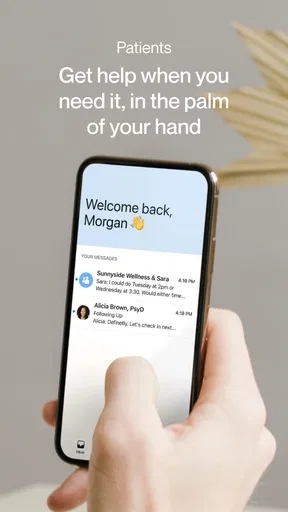
The central appeal is simple: instead of sending health-related messages through ordinary text, email, or scattered phone calls, a patient and a care team can communicate through a dedicated platform designed for medical use. Spruce describes itself as a HIPAA-compliant communication and care platform, and that distinction matters. In healthcare, the communication channel is not a minor detail. A missed message, an unclear reply, or a photo sent to the wrong place can create unnecessary stress and administrative work.
In my experience with apps in this category, the best ones are not necessarily the ones with the most visible tools. They are the ones that reduce uncertainty. Spruce is most useful when it gives a patient a clear route to the right practice and gives staff a manageable way to respond. That can make a difference for non-urgent questions, appointment-related communication, follow-up instructions, and other conversations that do not require an immediate phone call.
A realistic everyday example would be a patient who notices a change after a routine treatment and wants to ask the clinic whether it is expected. With a normal text message, the patient may wonder whether the number is monitored, whether the message is secure, and whether the right person will see it. With a dedicated medical communication app, the conversation has a clearer context. The patient can explain the situation in writing, and the clinic can review it through the channel it has chosen for patient communication.
That does not make the app suitable for emergencies. I would never treat a message in Spruce as a substitute for emergency services or urgent clinical attention. The convenience of written communication can also create a dangerous temptation to wait for a reply. If symptoms are severe, rapidly worsening, or potentially life-threatening, the correct action is to seek immediate help rather than open a messaging app.
The strongest part is the communication workflow
The most convincing reason to use Spruce is the separation between personal communication and healthcare communication. Patients often have several conversations happening at once: family messages, work email, delivery notifications, and medical questions. Putting care-related communication in its own environment makes it easier to remember what was discussed and easier to return to the conversation later.
That organization is particularly helpful when a discussion involves several small details. A patient may need to describe when a symptom began, mention a recent change, and refer back to an instruction from a previous exchange. Written communication gives both sides a record of the conversation rather than relying on memory from a short phone call. For a care team, that can also reduce the repeated explanations that happen when messages arrive through multiple unconnected channels.
Another useful trade-off is that written communication gives people time to be precise. I often find that phone calls are efficient when the question is simple, but they are less comfortable when I need to explain a sequence of events. A message allows the patient to check the wording before sending it. It also gives the clinic a chance to review the question rather than responding while distracted by another task.
That advantage has a limit, however. Written messages can be misunderstood, especially when a patient is anxious or when a clinical issue is complicated. Spruce can provide a better channel than ordinary texting, but it cannot remove the need for professional judgment, follow-up questions, or an actual appointment when the situation calls for one.
Where it fits beside ordinary alternatives
Compared with regular SMS, Spruce makes more sense for sensitive medical conversations because it is built around healthcare communication rather than general-purpose messaging. SMS is familiar and quick, but it can blur personal and professional boundaries. It may also leave patients unsure whether they are using the right number or whether a reply will be handled by the appropriate team.
Compared with email, the app is more focused. Email is useful for documents and longer explanations, but medical conversations can become difficult to track when they are mixed with unrelated messages, forwarded threads, or multiple addresses. A dedicated app can make the exchange feel more like an ongoing care conversation and less like an administrative inbox.
Compared with a phone call, Spruce is better for questions that are not urgent and for situations where a written record is useful. A call remains the better choice when the issue is complicated, emotionally difficult, or time-sensitive. I would also prefer speaking directly when the patient needs immediate clarification and cannot afford to wait for a response.
Compared with a broad patient portal, Spruce appears more focused on communication itself. A full portal may be preferable when a patient needs extensive access to records, billing, test results, scheduling, or other account functions. Spruce is more appealing when the immediate need is a dependable conversation with a practice. The right choice depends less on which app looks better and more on what the healthcare provider actually uses.
Small habits that make the app more useful
The first habit I would recommend is writing the question in a way that helps the recipient act. Instead of sending several short messages, I would put the key details together: what happened, when it started, what has changed, and what answer I need. This is not just a matter of neatness. A well-structured message can reduce back-and-forth communication and help the care team understand the situation faster.
The second is to keep urgent and non-urgent concerns separate in my own decision-making. The presence of a medical messaging app can make every problem feel suitable for messaging, but that is not true. Before sending anything, I would ask whether waiting for a normal response is safe. If the answer is no, I would use a more immediate route to care.
The third is to treat the conversation as part of a broader care process rather than as a standalone answer machine. If a clinician asks for more information, I would reply with the requested details instead of opening a new conversation elsewhere. Keeping the context together makes it easier for everyone to follow the issue, especially when the question develops over several exchanges.
A fourth practical point is to remember that the app's usefulness depends on the participating practice. A patient can download Spruce, but the experience is only meaningful if the relevant healthcare provider communicates through it. This is an important distinction from general messaging apps, where both people can simply choose to start a conversation. Here, the relationship with the clinic comes first.
The meaningful weakness: convenience can create expectations
My main criticism is not that Spruce is poorly suited to medical communication; it is that the convenience of messaging can make response time feel more predictable than it really is. Patients may send a question and then keep checking the app, especially when they are worried. If a clinic has its own hours, triage process, or message volume, the app cannot guarantee an immediate answer.
This creates a practical responsibility for both sides. Patients need to understand that a message is not the same as a live conversation. Clinics need to make their communication expectations clear so that patients know when messaging is appropriate and what to do if they need urgent help. Without that shared understanding, even a well-designed channel can produce frustration.
There is also a learning curve for people who are not comfortable with digital healthcare. A patient who already struggles with logins, notifications, or switching between apps may find another communication tool tiring rather than reassuring. The app may be free, but using it still requires a compatible device, enough confidence to communicate digitally, and a provider willing to support the workflow.
For clinics, the trade-off is equally real. A dedicated communication system can bring order, but it also introduces another place that staff must monitor and manage. If a practice continues using phone calls, email, a patient portal, and Spruce without a clear division between them, the result may be more fragmentation instead of less. The app works best when the organization commits to a consistent process.
Who should use Spruce?
I would recommend Spruce to patients whose doctors, therapists, specialists, or other care providers actively use it for communication. It is especially suitable for people who prefer writing to calling, need to explain details carefully, or want their non-urgent questions kept in a dedicated medical conversation. It can also be useful for people who regularly need follow-up communication and find ordinary texting too informal for healthcare.
It is a good fit for a clinic that wants to offer a clearer alternative to personal phone numbers and general email accounts. A practice may benefit from giving patients a recognizable place to send questions, particularly when staff need to keep communication connected to the care relationship. The strongest results are likely when the team has agreed on who reviews messages, how conversations are routed, and how urgent matters are handled.
I would be more cautious about recommending it to someone who expects a complete replacement for a patient portal. If the main goal is viewing a broad collection of records, handling every administrative task, or managing a large range of account functions, a full healthcare portal may be a better fit. I would also not choose it as my primary option if the provider does not use Spruce consistently, because the app cannot create a useful channel by itself.
People who rarely use smartphones or who strongly prefer speaking with a person may also be happier with phone-based care. That is not a criticism of the app; it is a reminder that communication tools should match the patient, not just the clinic. Accessibility includes comfort and confidence, not only technical availability.
Version, availability, and long-term practicality
The current version is 4.5.14, and the app supports devices running Android 8.0 or later. That makes it accessible to many users, although anyone with an older phone should check compatibility before planning to rely on it. Since this is a medical communication tool, keeping the app updated is sensible. A communication app is only useful if notifications, sign-in, and message delivery work reliably on the device being used.
Spruce was released on February 25, 2016, so it is not a brand-new experiment. Its time in the medical app space helps explain why it feels like a focused product rather than a general chat application with healthcare language added around it. The developer's continued versioning also suggests an app intended for ongoing use, although the real test for any patient is still whether their own provider uses it well.
The free price removes one obvious barrier for patients, but it does not remove the practical conditions around adoption. A person still needs a participating healthcare organization and a device that meets the operating-system requirement. For a clinic, the more important question is not simply whether the app is available, but whether it fits the team's existing communication habits and patient support process.
My final view after weighing the trade-offs
Spruce succeeds because it keeps its purpose clear. It gives medical communication a dedicated home and offers a more appropriate alternative to casual texting or scattered email. In my view, its strongest value is not a flashy feature; it is the reduction of ambiguity around where a patient should send a non-urgent healthcare question and where a care team should look for it.
At the same time, I would not present it as a universal answer. It does not replace emergency care, a phone conversation, an appointment, or a full patient portal. Its usefulness depends heavily on provider participation and on realistic expectations about response times. Patients who understand those boundaries are much more likely to find it reassuring rather than frustrating.
Overall, I would recommend Spruce to anyone whose healthcare provider already works with it and who wants a more organized way to communicate about care. I would skip it as a standalone download if no relevant practice is connected, and I would choose a different tool when the priority is comprehensive records or instant assistance. For its intended role, though, it is a thoughtful medical communication app: practical, focused, and most valuable when both patient and provider use it as part of a clear workflow.
My bottom line: Spruce is best viewed as a secure, provider-led communication bridge, not as a complete healthcare system. Used that way, it can make everyday follow-up easier without pretending that a message can replace the human decisions at the heart of medical care.
Privacy and Permissions
See what permissions an app requests and how it handles your data.
- Contacts
- read your contacts
- Phone
- directly call phone numbers, read phone status and identity
- Photos/Media/Files
- read the contents of your USB storage
- Storage
- read the contents of your USB storage
- Camera
- take pictures and videos
- Microphone
- record audio
- Wi-Fi connection information
- view Wi-Fi connections
- Device ID & call information
- read phone status and identity
- Other
- view network connections, pair with Bluetooth devices, full network access, change your audio settings, run at startup, draw over other apps, control vibration, prevent device from sleeping
Verdict
Strengths of Spruce: Medical Communication
- Clear, professional templates support consistent patient communication.
- Useful for organizing messages, forms, and care-related information in one place.
- Can help reduce repetitive administrative work for healthcare teams.
- Patient-friendly communication may improve understanding of medical instructions.
- Designed with healthcare workflows and privacy needs in mind.
Limitations of Spruce: Medical Communication
- Access may depend on an organization or healthcare provider using Spruce.
- Some advanced tools may require a paid plan or institutional subscription.
- The app may feel overwhelming until users learn its workflow and settings.
- Notification volume can become distracting when handling many conversations.
- Certain features may vary by region, account type, or provider configuration.
Similar Picks in This Category
View All
WebMD: Symptom Checker
WebMD, LLC4.1

Microphone Amplifier
DOSA Apps4.2

Anatomy Learning - 3D Anatomy
3D Medical OU4.5

Period Tracker and Calendar
SimpleInnovation4.9

GoodRx: Prescription Coupons
GoodRx4.8

CVS Health
CVS Pharmacy4.5
Frequently Asked Questions
What is Spruce: Medical Communication used for?
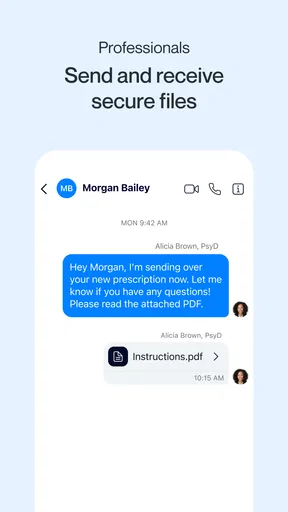
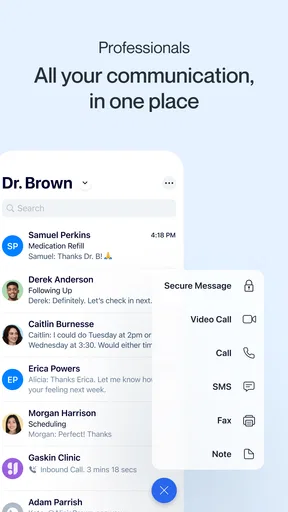
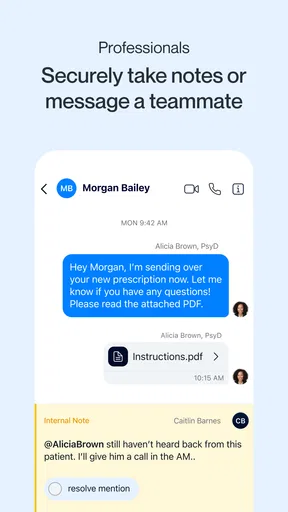
Spruce: Medical Communication is a secure messaging and communication app designed to help healthcare providers communicate with patients, colleagues, and care teams. Depending on how a clinic configures it, users may be able to exchange messages, share photos or documents, join telehealth visits, receive appointment-related updates, and manage communication in one place. Available features can vary by provider and subscription.
Is Spruce: Medical Communication secure and suitable for sharing medical information?
Spruce is built for healthcare communication and includes privacy and security features intended to support the handling of protected health information. However, security also depends on your healthcare organization’s settings, your device, and how you use the account. Use a strong password, enable available security options, avoid sharing login details, and contact your provider directly if you receive a suspicious message or request.
Do I need an invitation from a healthcare provider to use Spruce?
In most cases, Spruce is used through an invitation, connection, or account created by a participating healthcare practice. Simply downloading the app may not provide access to all of its functions. Your clinic may send instructions by text message or email and may require identity verification before you can communicate with the care team. Ask the provider for help if the invitation has expired.
Can I use Spruce for urgent medical problems or emergencies?
Spruce should not be treated as a replacement for emergency services or immediate medical care. Message response times depend on the healthcare provider, and the app may not be monitored continuously. For severe symptoms, danger, or a potentially life-threatening situation, call your local emergency number or go to the nearest emergency department. For non-emergency concerns, follow your provider’s instructions.
Does Spruce support video calls, file sharing, and communication with multiple providers?
The app may support features such as secure text messaging, photo or document sharing, video visits, forms, and communication with members of a healthcare team, but the exact tools available depend on the organization using Spruce. Some providers may enable only messaging, while others offer a broader virtual-care experience. Check your clinic’s instructions to learn which features and file types are supported.
